About
Table of contents
Introduction
This portfolio was created using the Sphinx framework. With the implementation of a skin/theme called Rtd (ReadTheDocs), the site is given color, life - and ease of readability, lest not forget dynamic compatability. The reason why this site exists is as it is a part of the programmers portfolio in order to succesfully pass his semester Cyber Security minor at the Fontys Hogescholen University of Applied Sciences.
See also
Besides this website containing the documentaiton of my Cyber Security Minor you can visit my full portfolio on https://oksolution.nl.
Setup
This chapter was implemented to make the programmer(Onur Kapisiz) more familiar with the Markdown syntax of reStructuredText(.rst). The infrastructure relies on apache being used.
Apache & Sphinx
$ apt install apache2
$ pip install sphinx
$ pip install sphinx_rtd_theme
Integrating Apache with Sphinx
$ apt install apache2
$ cd /var/www/html/
$ sphinx-quickstart
In your conf.py file:
import sphinx_rtd_theme

extensions = [
    ...
    'sphinx_rtd_theme',
]

html_theme = "sphinx_rtd_theme"
Warning
TODO: Add git url
Download the project
$ git clone github.com/url
$ make html
You will now be able to view the site locally.
Deployment
Architecture
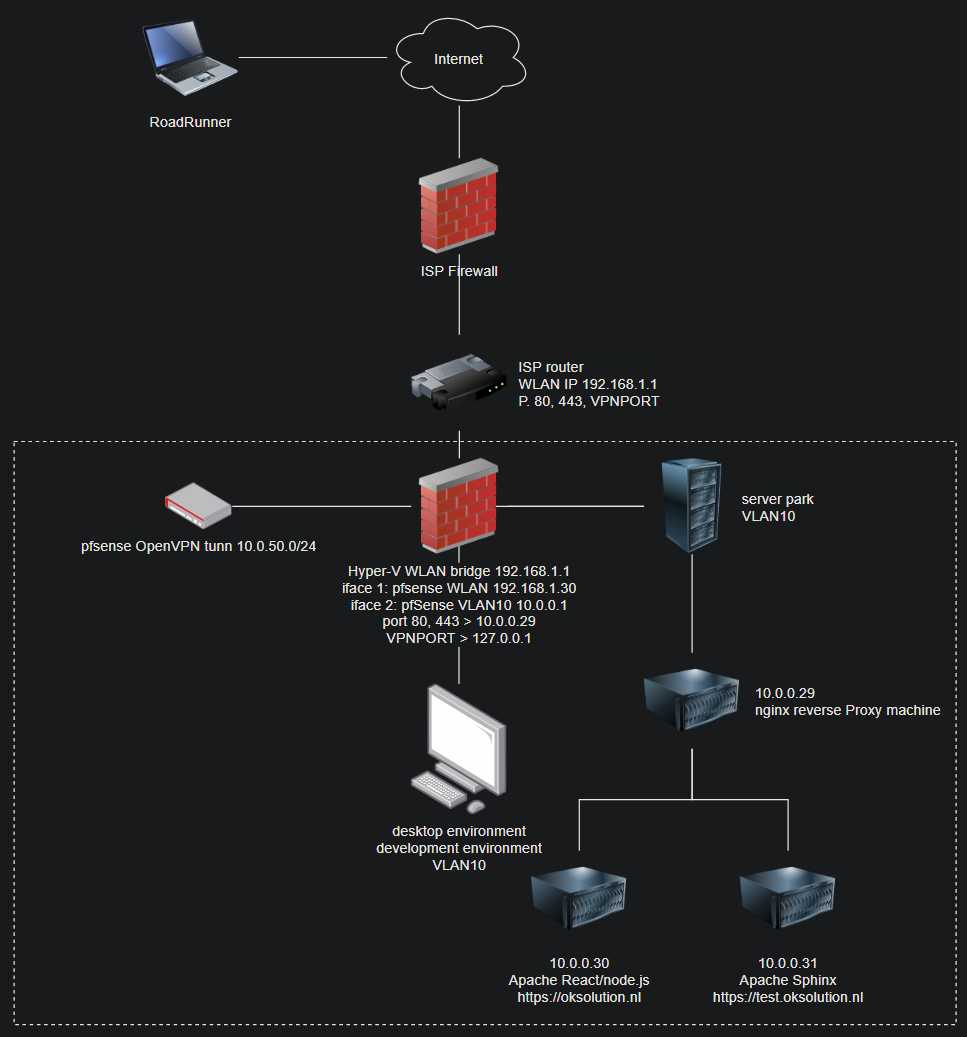
Current network diagram
Danger
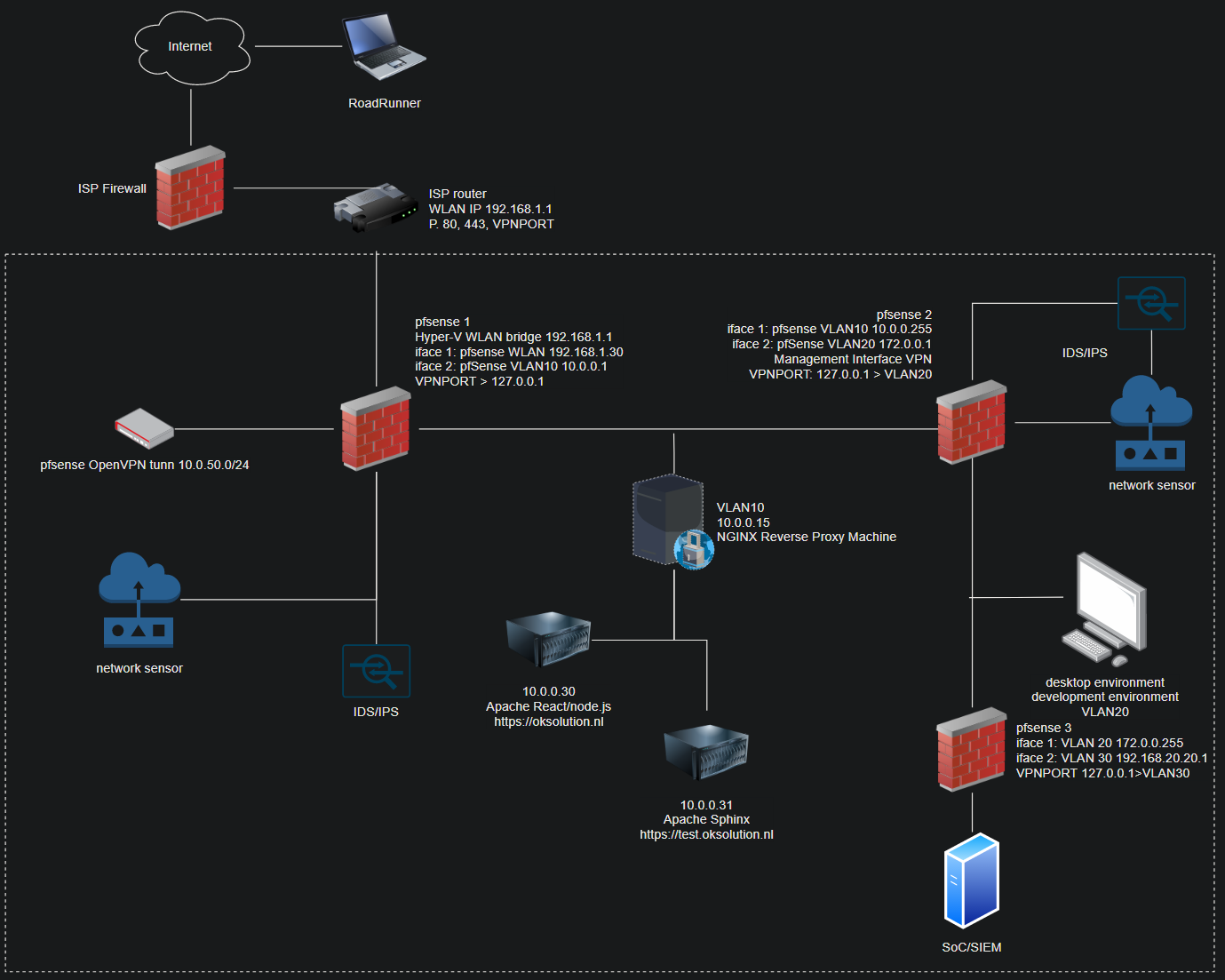
The reason it is not ideal is due to the desktop environment of the programming being in the same VLAN as the servers hosting various services. It is best to segregate this via another network interface to segregate the two environments. An ideal solution would be to use a management interface(another layer of security) in case a breach occurs.
Improved environment
Hint
The reason why it would be an improvement is due to the added layer of security by introducing a management interface, which could be hardened more - would likely involve MFA. Once a data breach occurs, access is only granted in an isolated environment. With each additional network interface, multiple layers of security can be introduced.
Platform
My entire environment is virtualized, and runs on Hyper-V. PfSense is mostly used to grant access from the outside - as half the development work dedicated to this site is done remotely (through university campus).
Warning
TODO Update when further in the project
Hyper-V setup
Machines |
RAM |
OS |
‘24/7’ |
|---|---|---|---|
pfSense |
2048M |
FreeBSD |
Enabled |
oksolution.nl |
2048M |
Ubuntu |
Enabled |
test.oksolution.nl |
2048M |
Ubuntu |
Enabled |
reverse-proxy |
2048M |
Ubuntu |
Enabled |
kali(unrelated) |
4096M |
Debian |
Development
To develop this site, visual studio code with a SFTP pointed towards test.oksol ip was used. With a simple bash script running on the machine to keep compiling the program. I was too lazy to trigger the compilation upon saving something through SFTP. The Sphinx - Read the Docs was and can be used to expand the usability of the environment.
Create the Janky Auto-Recompiler
Create the files for the JAT.
$ cd /var/www/html/(sphinx root folder where index.rst is)
$ touch janky_auto_compiler.sh
$ vi janky_auto_compiler.sh
Source of the Janky Auto-Recompiler
In the shell script below I’ve added a sleep and a cute little progress bar. You could do it without the sleep function, but it’ll likely show you the ‘default’ page every other refresh.
#!/bin/bash
while true
do
        cp -rf /home/(user)/(websitefolder)/* /var/www/html/localhost/csdocs/ && make html && date
        echo -ne '\e[32m###                     (20%)\n'
        sleep 3
        echo -ne '\e[32m######                  (40%)\n'
        sleep 3
        echo -ne '\e[32m##########              (60%)\n'
        sleep 3
        echo -ne '\e[32m############            (80%)\n'
        sleep 3
        echo -ne '\e[32m##############          (100%)\n'
        sleep 3
done
As you can see every 15 seconds it refreshes itself.
Warning
TODO Make a script that fires when SFTP is used to save the changes on the development machine.